www.it-connect.fr

StegoAd: Malware Hidden in 119 Microsoft Edge Extensions
119 malicious extensions have been removed from the Microsoft Edge browser extension store. Their common feature: malicious code hidden inside images and fonts, which did not wake up until several days after installation on a machine. Dubbed StegoAd, the campaign reportedly reached as many as 2.6 million installs and is believed to be the work of a single hacker group active since at least 2021. Here is what we know.
The Microsoft Edge Extensions Security team recently published a report on a campaign dubbed StegoAd. The name was not chosen at random. It refers to two techniques used in this attack: steganography, the art of hiding data inside an innocuous-looking file, and adware, advertising fraud. According to Microsoft, these 119 extensions were distributed through more than 90 developer accounts, all of which are now suspended.
119 extensions, 2.6 million installs: the anatomy of StegoAd
As often happens, the attackers designed the malicious extensions to look legitimate and harmless: ad blockers, VPNs, translators, video downloaders. Each of these extensions actually performed its advertised function, enough to gather positive reviews and avoid raising suspicion.
What is interesting about these extensions is that malicious activity remains dormant during the first few days after installation. According to Microsoft, the malicious code stayed inactive as long as a set of prerequisites was not met:
- A waiting period of 3 to 5 days after installation, enough to fly under the radar of automated analysis environments (sandbox).
- Probabilistic execution: the code did not trigger every time.
- Server-side validation of requests before any malicious payload delivery.
- Detection of developer tools: if the extension detected DevTools being opened, it extended its dormant state.
In total, these extensions account for 2.6 million installs between March 2024 and April 2026, but that does not equal the total number of victims. Between the various conditions mentioned above, including the activation delay and server-side validation, the malicious payload was never executed for many installations. As a result, the actual number of people affected by this campaign remains unknown.
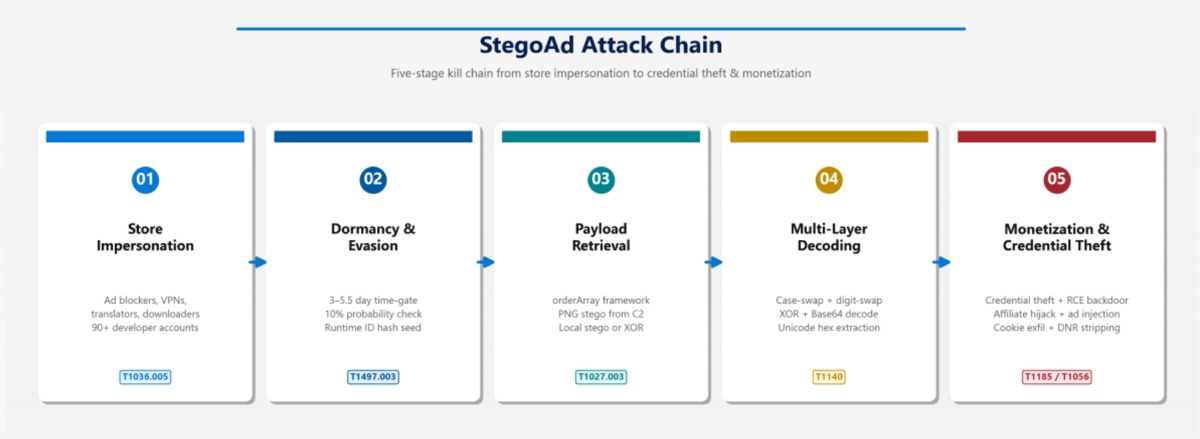
Microsoft's analysis highlights several malicious actions carried out on machines where the malware became active. These include ad fraud: injected ads, hijacked affiliate commissions on Amazon, eBay and AliExpress, and redirected search results.
But that is not all. It also includes a backdoor capable of allowing attackers to execute JavaScript code remotely, as well as credential theft. The malware targets Google credentials, WordPress admin credentials, and mass cookie exfiltration for session hijacking.
This is the campaign's signature. Here, steganography involves slipping executable code into ordinary image files. According to Microsoft, the threat actor evolved its technique as detections improved, through four stages:
- Booby-trapped PNG icon: JavaScript added after the
IENDmarker of the extension icon. The image displays normally everywhere, but it contains a payload that static scanners do not detect. - Remote PNG: an image fetched from a command-and-control (C2) server, containing the encoded payload.
- WebP containers: once PNG detections improved, the attacker switched to a format that analysis rules did not yet cover.
- WOFF2 fonts: the code was hidden inside font files, where it passed for simple typographic data.
Decoding then stacked multiple layers: case inversion, digit reversal, Base64 and XOR, with signature verification before execution.
On the infrastructure side, Microsoft counted more than ten C2 domains with automatic failover, traffic relayed through Cloudflare Workers, and abuse of GitHub Pages to host tracking tags (notably for Google Analytics).
This mechanism is reminiscent of GhostPoster, the campaign involving 17 malicious extensions targeting Chrome, Edge and Firefox that we covered in January. According to The Hacker News, which relies on research from Koi Security, StegoAd reportedly shares several similarities with GhostPoster: the same hiding method in the icon, identical extension names, and an exfiltration domain, mitarchive.info, linked to the Chinese operation DarkSpectre.
The link remains to be confirmed: Microsoft, for its part, did not name the hacker group in its report, although it did note that the threat actor remains active. The booby-trapped image technique is not new in the cyber world either, as shown by ClickFix attacks hiding malware inside a PNG file.
Are you affected? The steps to take
The full list of identifiers for the 119 extensions is available in Microsoft's published report. To check your environment, here is what you should do:
- Open
edge://extensionsand compare the installed extensions with Microsoft's list. - If there is a match, or if Edge has automatically removed an extension, consider the browser compromised.
- Reset the passwords for sensitive accounts: Google, WordPress, banking.
- Review recent sign-in activity.
- Enable strong two-factor authentication (security keys, for example).